
Using Saved Carts
Saved Carts are a simple but powerful feature that help you save time and stay organized.
Instead of rebuilding the same order again and again, you can save your cart and return to it whenever you’re ready. This is especially useful if you place regular orders or need time to review items before purchasing.
This guide explains how to save your cart and when using Saved Carts can make your ordering process easier.
What is a Saved Cart?
A Saved Cart is a copy of the items currently in your shopping cart that you can store in your account. You can reopen it later, make changes, and complete your order when you're ready.
Saved Carts allow you to:
-
Avoid searching for the same items repeatedly
-
Prepare orders in advance
-
Organize recurring purchases
-
Review orders before submitting them
Think of it as a “draft order” that you can reuse anytime.
How to Save Your Cart
Saving your cart only takes a few steps:
1. Add Items to Your Cart – Browse products and click Add to Cart for each item you want to order.
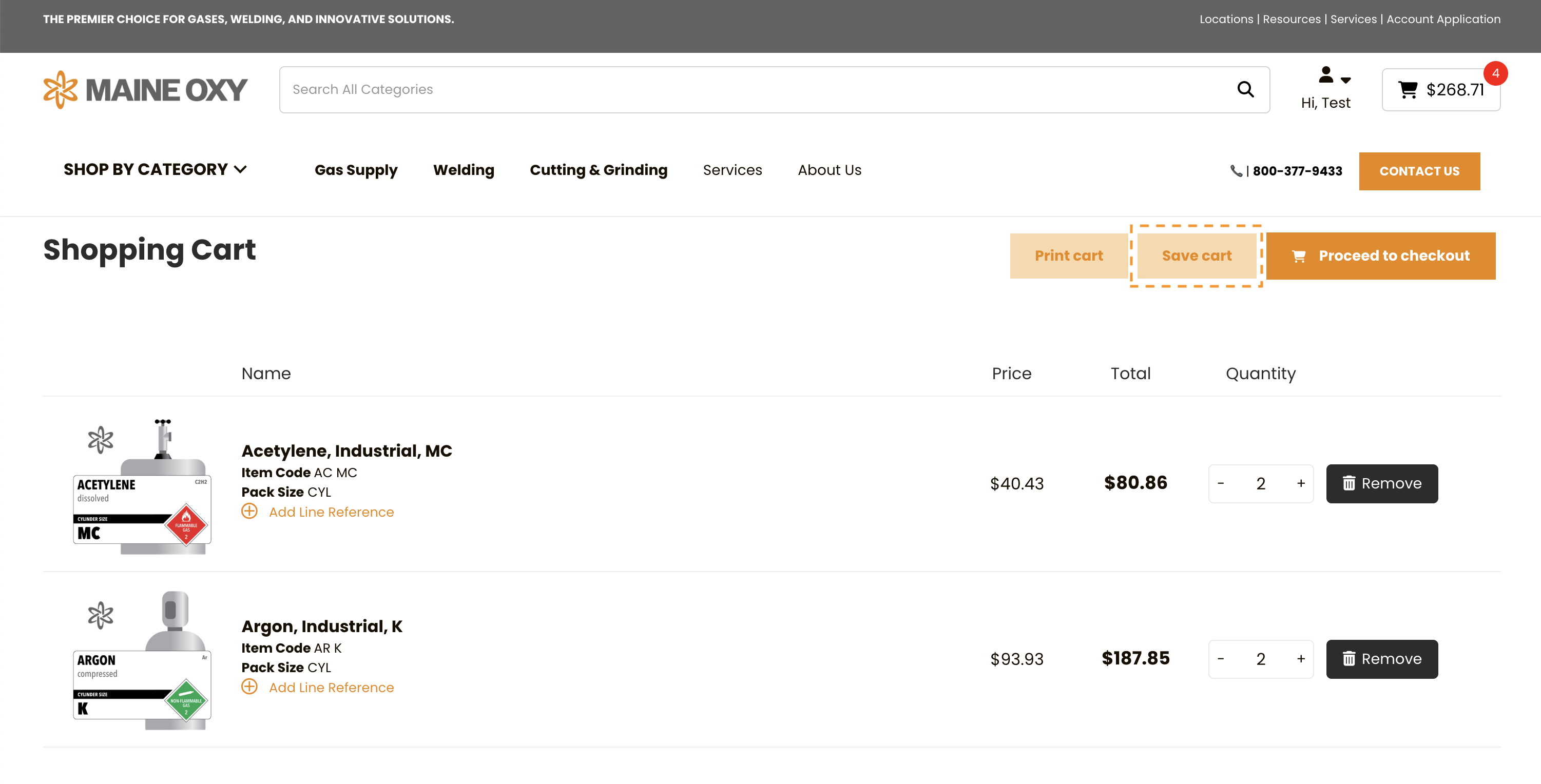
2. Open Your Shopping Cart – Click the cart icon to view all selected items.
3. Select “Save Cart” – Click the Save Cart button.
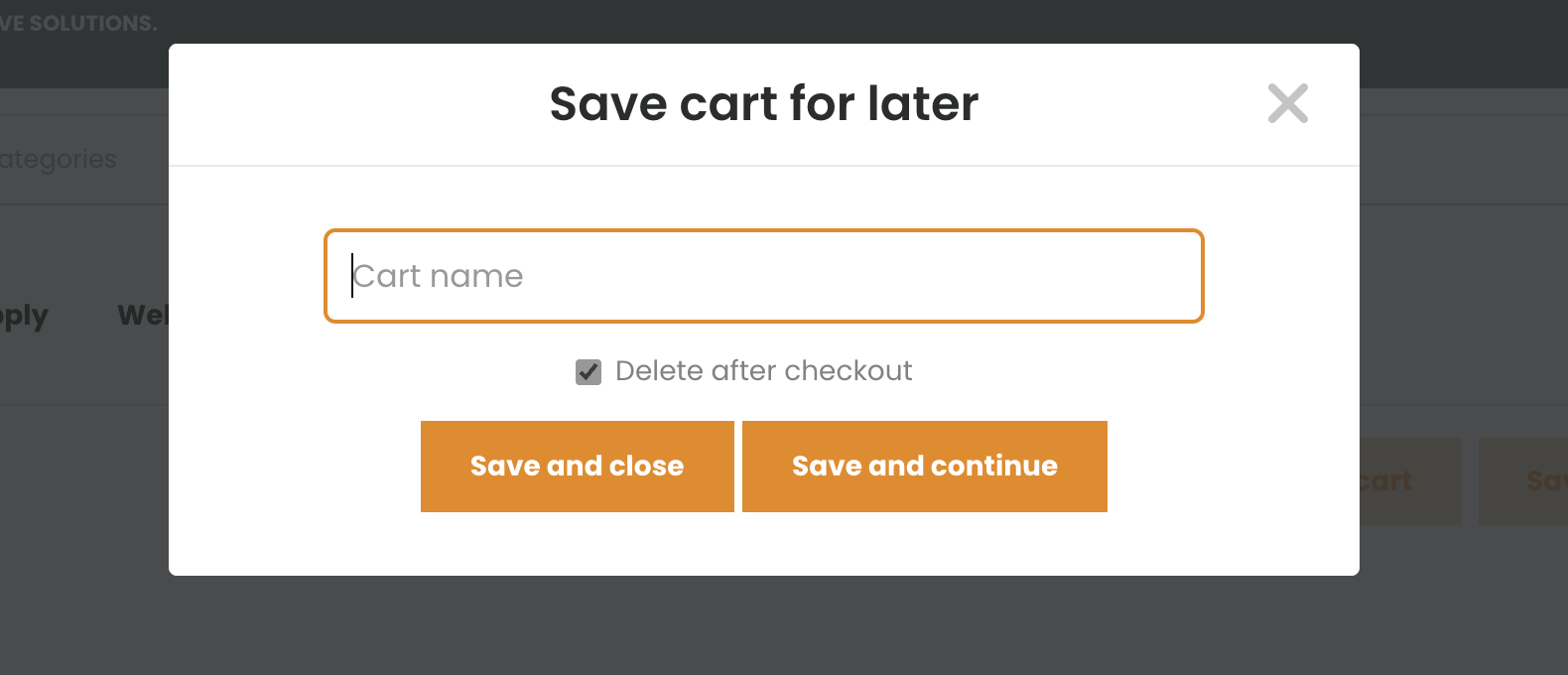
4. Name Your Cart – Give your cart a name that helps you remember its purpose.
-
-
Weekly Shop Supplies
-
Shop Oxygen Refill
-
Maintenance Order
-
5. Click Save and Close – Your cart is now stored in your account and will be closed to access at a later date.
6. Click Save and Continue – Your cart is now stored in your account and you will be able to continue shopping and adding items to your cart.
How to Access and Use a Saved Cart
When you’re ready to use your saved cart:
1. Log in to your account
2. Navigate to Saved Carts from your dashboard or account menu
3. Select the saved cart you want
4. Click Load Cart
5. Review items and quantities
6. Complete your checkout
You can also edit, rename, or delete saved carts at any time.
Why Saved Carts Are Useful
Saved Carts are especially helpful for customers who place regular or planned orders.
Here are some common examples:
Weekly or Monthly Orders
If you order the same supplies every week or month, you can save your cart once and reuse it. This eliminates the need to search for each item again.
Recurring Business Needs
Many businesses order the same products for routine operations. Saved Carts make this process faster and more consistent.
Planning Orders in Advance
Sometimes you may need to prepare an order but wait for approval or the right timing before placing it.
Ordering for Different Departments or Projects
You can create multiple saved carts for different purposes.
Best Practices for Using Saved Carts
To get the most out of this feature:
-
Use clear, descriptive names for your saved carts.
-
Review quantities before placing each order.
-
Update saved carts if your needs change.
-
Delete saved carts you no longer use to keep things organized
Saved Carts help you order faster, reduce mistakes, and stay organized. Whether you place weekly orders or prepare carts in advance, this feature gives you greater control and convenience.
Start using Saved Carts today to make your Maine Oxy ordering process quicker and easier.
Have a question?
We're here to help.
CONTACT US
OTHER SUPPORT TOPICS
Saved Carts are a simple but powerful feature that help you save time and stay organized.
Instead of rebuilding the same order again and again, you can save your cart and return to it whenever you’re ready. This is especially useful if you place regular orders or need time to review items before purchasing.
This guide explains how to save your cart and when using Saved Carts can make your ordering process easier.
What is a Saved Cart?
A Saved Cart is a copy of the items currently in your shopping cart that you can store in your account. You can reopen it later, make changes, and complete your order when you're ready.
Saved Carts allow you to:
-
Avoid searching for the same items repeatedly
-
Prepare orders in advance
-
Organize recurring purchases
-
Review orders before submitting them
Think of it as a “draft order” that you can reuse anytime.
How to Save Your Cart
Saving your cart only takes a few steps:
1. Add Items to Your Cart – Browse products and click Add to Cart for each item you want to order.
2. Open Your Shopping Cart – Click the cart icon to view all selected items.
3. Select “Save Cart” – Click the Save Cart button.
4. Name Your Cart – Give your cart a name that helps you remember its purpose.
-
-
Weekly Shop Supplies
-
Shop Oxygen Refill
-
Maintenance Order
-
5. Click Save and Close – Your cart is now stored in your account and will be closed to access at a later date.
6. Click Save and Continue – Your cart is now stored in your account and you will be able to continue shopping and adding items to your cart.
How to Access and Use a Saved Cart
When you’re ready to use your saved cart:
1. Log in to your account
2. Navigate to Saved Carts from your dashboard or account menu
3. Select the saved cart you want
4. Click Load Cart
5. Review items and quantities
6. Complete your checkout
You can also edit, rename, or delete saved carts at any time.
Why Saved Carts Are Useful
Saved Carts are especially helpful for customers who place regular or planned orders.
Here are some common examples:
Weekly or Monthly Orders
If you order the same supplies every week or month, you can save your cart once and reuse it. This eliminates the need to search for each item again.
Recurring Business Needs
Many businesses order the same products for routine operations. Saved Carts make this process faster and more consistent.
Planning Orders in Advance
Sometimes you may need to prepare an order but wait for approval or the right timing before placing it.
Ordering for Different Departments or Projects
You can create multiple saved carts for different purposes.
Best Practices for Using Saved Carts
To get the most out of this feature:
-
Use clear, descriptive names for your saved carts.
-
Review quantities before placing each order.
-
Update saved carts if your needs change.
-
Delete saved carts you no longer use to keep things organized
Saved Carts help you order faster, reduce mistakes, and stay organized. Whether you place weekly orders or prepare carts in advance, this feature gives you greater control and convenience.
Start using Saved Carts today to make your Maine Oxy ordering process quicker and easier.