
Account Overview
Whether you’re here to place orders, manage invoices, or explore our product categories, this guide will help you navigate your account with confidence.
The Dashboard:
Your Account Home
When you first log in, you’ll land on your account dashboard.
Here you will be able to:
- Download & Pay Invoices
- Edit Saved Carts
- Download & View Recent Orders
- Edit Credit Card Information
- Edit User Profile Information
Think of the dashboard as your personal control panel for managing all your Maine Oxy activities.
Account Menu
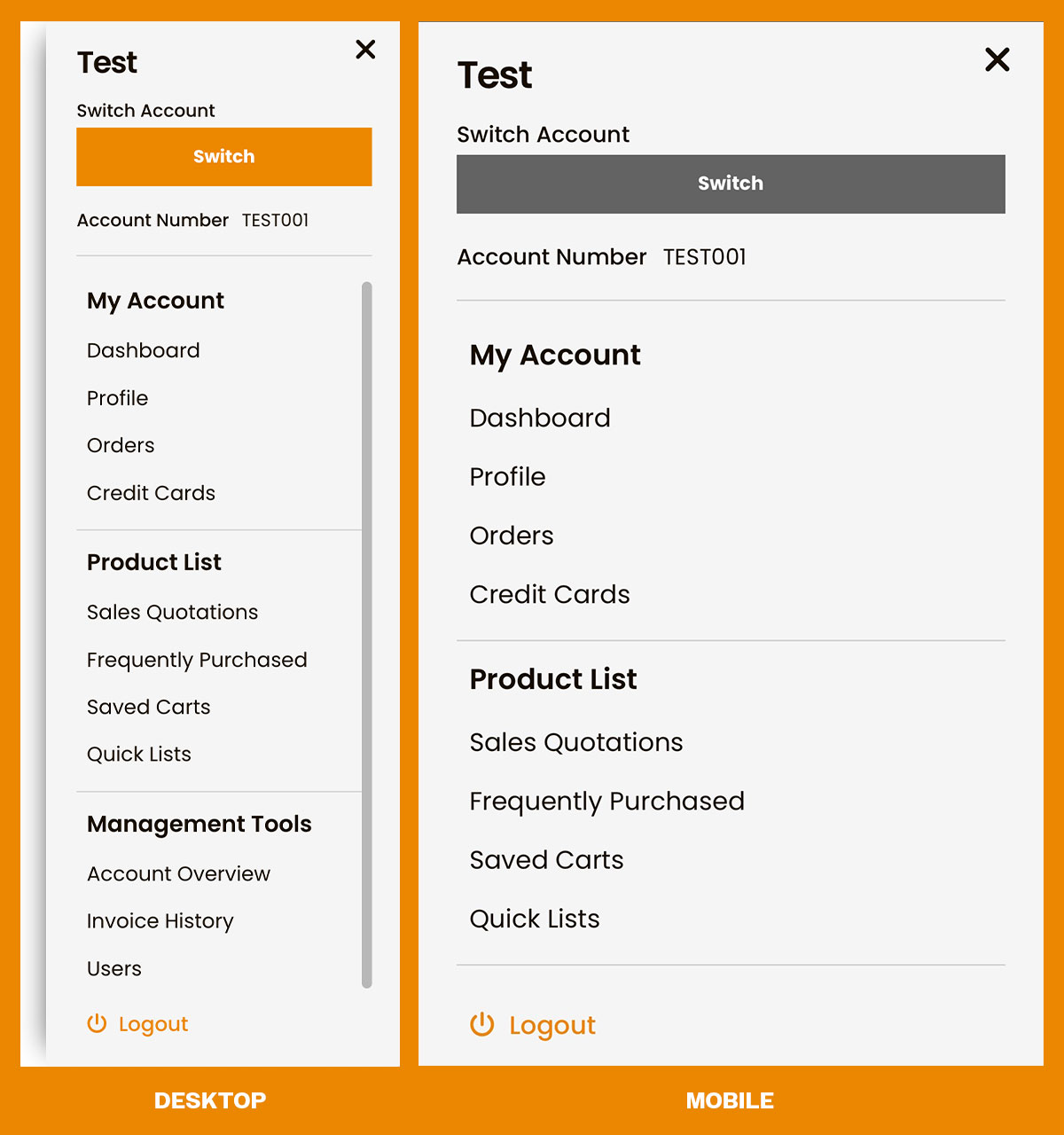
The Account Menu gives you quick access to all the tools you need to manage your Maine Oxy account. From viewing your dashboard, managing profile information, orders, invoices, and credit cards, to keeping track of saved carts, frequently purchased items, and quick lists, everything is organized in one convenient place.
Click the silhouette icon to the right of the search bar to access this menu.
Managing Your User Profile
Your user profile stores all the information you need for smooth shopping:
- Profile Information – Update your name, email, and phone number.
- Password & Security – Change your password anytime to keep your account safe.
- Preferences – Set your communication preferences to receive only the notifications you want.
Keeping your account information current ensures orders and invoices reach you without any hassle.
Viewing and Managing Orders
Under orders is where you can:
- Check the status of recent orders
- Download or print invoices for each purchase
- Track shipments directly from your account
- Request returns or replacements if needed
Even if you’re new to online shopping, Maine Oxy makes it easy to follow each order from purchase to delivery.
Managing Invoices
Every transaction you make is stored safely in your account:
- View Invoices – Download or print copies for your records.
- Make Payments – Track past transactions and payment methods used.
This keeps your records organized, saving you time and effort.
Have a question?
We're here to help.
CONTACT US
OTHER SUPPORT TOPICS
Whether you’re here to place orders, manage invoices, or explore our product categories, this guide will help you navigate your account with confidence.
The Dashboard:
Your Account Home
When you first log in, you’ll land on your account dashboard.
Here you will be able to:
- Download & Pay Invoices
- Edit Saved Carts
- Download & View Recent Orders
- Edit Credit Card Information
- Edit User Profile Information
Think of the dashboard as your personal control panel for managing all your Maine Oxy activities.
Account Menu
The Account Menu gives you quick access to all the tools you need to manage your Maine Oxy account. From viewing your dashboard, managing profile information, orders, invoices, and credit cards, to keeping track of saved carts, frequently purchased items, and quick lists, everything is organized in one convenient place.
Click the silhouette icon to the right of the search bar to access this menu.
Managing Your User Profile
Your user profile stores all the information you need for smooth shopping:
- Profile Information – Update your name, email, and phone number.
- Password & Security – Change your password anytime to keep your account safe.
- Preferences – Set your communication preferences to receive only the notifications you want.
Keeping your account information current ensures orders and invoices reach you without any hassle.
Viewing and Managing Orders
Under orders is where you can:
- Check the status of recent orders
- Download or print invoices for each purchase
- Track shipments directly from your account
- Request returns or replacements if needed
Even if you’re new to online shopping, Maine Oxy makes it easy to follow each order from purchase to delivery.
Managing Invoices
Every transaction you make is stored safely in your account:
- View Invoices – Download or print copies for your records.
- Make Payments – Track past transactions and payment methods used.
This keeps your records organized, saving you time and effort.