
Check a recent charge. Download invoices for your records. Submitting a payment. Everything you need is available in one convenient place. Let's walk you through how to access your invoices and complete payments with confidence. Even if you’re new to online account management.
Where to Find Your Invoices
All of your invoices are stored securely in your account.
To view them:
Log in to your account
From your Account Dashboard, click the "Download & Pay Invoices" button.
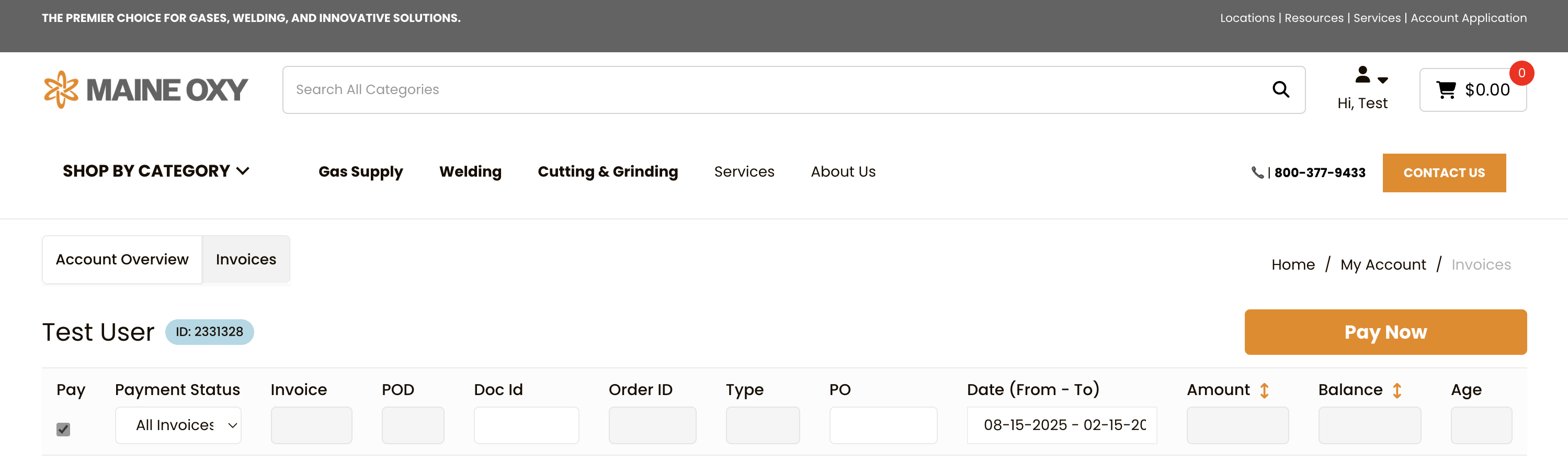
You’ll see a list of invoices with helpful details such as:
-
Payment Status (Paid or Unpaid)
-
Invoice PDF
-
Proof-of-Delivery PDF (if available)
-
Doc ID
-
Order ID
-
Type
- PO
-
Date
-
Amount
-
Balance
-
Age
This list gives you a clear overview of your billing activity at any time.
Viewing and Downloading an Invoice
If you need a copy for your records:
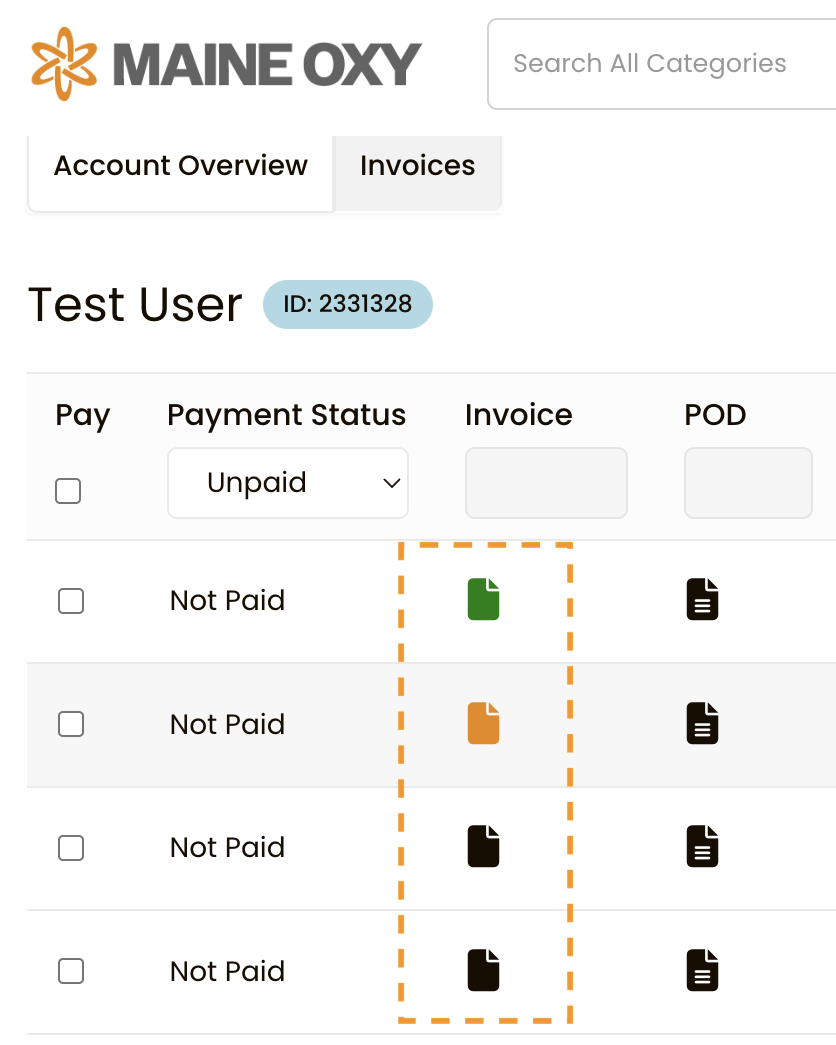
Click on the Invoice Icon and your PDF will open in a new window automatically.
Understanding Invoice Status
Each invoice will show a payment status:
-
Not Paid – Payment has not yet been received
-
Paid – The invoice has been successfully processed
Checking your invoice status regularly helps you avoid late payments and ensures your account remains in good standing.
How to Pay an Invoice Online
Paying online is quick and secure.
To submit a payment:
1. Select the invoice you want to pay using the box in the first column.
2. Click the Pay Now Button.
4. Select or enter your credit card information.
5. Click Pay Now.
Once processed, your invoice status will update to Paid.
Paying Multiple Invoices at Once
If you have more than one open invoice, you may have the option to:
1. Select multiple invoices using the boxes in the first column
2. Click the Pay Now Button
3. Submit one combined payment
This saves time and simplifies accounting for businesses that manage several orders.
Keeping Your Billing Information Updated
To ensure smooth payments:
-
Verify your billing address is correct
-
Keep your preferred payment method up to date
-
Review invoice due dates regularly
Accurate information helps prevent delays or declined payments.
Why Managing Invoices Online Is Helpful
Using your Maine Oxy account to manage invoices provides several advantages:
Faster Record Access
No need to search through emails or paper copies.
Better Organization
All invoices are stored in one secure location.
Improved Cash Flow Awareness
You can see open balances and due dates at a glance.
Convenience
Submit payments anytime — no phone calls required.
Stay in Control of Your Account
Managing and paying invoices online gives you greater visibility and control over your purchases. Whether you’re overseeing weekly supply orders or tracking monthly expenses, your Maine Oxy account keeps your billing information organized and accessible.
If you ever have questions about an invoice, our customer support team is ready to help.
Log in today to review your billing activity and experience how simple invoice management can be.
Have a question?
We're here to help.
CONTACT US
OTHER SUPPORT TOPICS
Check a recent charge. Download invoices for your records. Submitting a payment. Everything you need is available in one convenient place. Let's walk you through how to access your invoices and complete payments with confidence. Even if you’re new to online account management.
Where to Find Your Invoices
All of your invoices are stored securely in your account.
To view them:
Log in to your account
From your Account Dashboard, click the "Download & Pay Invoices" button.
You’ll see a list of invoices with helpful details such as:
-
Payment Status (Paid or Unpaid)
-
Invoice PDF
-
Proof-of-Delivery PDF (if available)
-
Doc ID
-
Order ID
-
Type
- PO
-
Date
-
Amount
-
Balance
-
Age
This list gives you a clear overview of your billing activity at any time.
Viewing and Downloading an Invoice
If you need a copy for your records:
Click on the Invoice Icon and your PDF will open in a new window automatically.
Understanding Invoice Status
Each invoice will show a payment status:
-
Not Paid – Payment has not yet been received
-
Paid – The invoice has been successfully processed
Checking your invoice status regularly helps you avoid late payments and ensures your account remains in good standing.
How to Pay an Invoice Online
Paying online is quick and secure.
To submit a payment:
1. Select the invoice you want to pay using the box in the first column.
2. Click the Pay Now Button.
4. Select or enter your credit card information.
5. Click Pay Now.
Once processed, your invoice status will update to Paid.
Paying Multiple Invoices at Once
If you have more than one open invoice, you may have the option to:
1. Select multiple invoices using the boxes in the first column
2. Click the Pay Now Button
3. Submit one combined payment
This saves time and simplifies accounting for businesses that manage several orders.
Keeping Your Billing Information Updated
To ensure smooth payments:
-
Verify your billing address is correct
-
Keep your preferred payment method up to date
-
Review invoice due dates regularly
Accurate information helps prevent delays or declined payments.
Why Managing Invoices Online Is Helpful
Using your Maine Oxy account to manage invoices provides several advantages:
Faster Record Access
No need to search through emails or paper copies.
Better Organization
All invoices are stored in one secure location.
Improved Cash Flow Awareness
You can see open balances and due dates at a glance.
Convenience
Submit payments anytime — no phone calls required.
Stay in Control of Your Account
Managing and paying invoices online gives you greater visibility and control over your purchases. Whether you’re overseeing weekly supply orders or tracking monthly expenses, your Maine Oxy account keeps your billing information organized and accessible.
If you ever have questions about an invoice, our customer support team is ready to help.
Log in today to review your billing activity and experience how simple invoice management can be.